Integrations

Works with what you already use

Kasset records Zoom, Meet and Teams calls without a bot, takes your Plaud recordings, and sends the notes to HubSpot, Notion, Slack and 25 more tools.

Online meetings

Zoom, Google Meet and Teams, with no bot

Kasset is an AI note taker that records from your Mac, not from inside the call. It notices when a meeting starts and offers to record. Your microphone and the rest of the call come in on separate tracks, so Kasset can tell your voice from everybody else's.

On Mac today. Windows is next.

Also detected: FaceTime, Whereby, Jitsi, Around, Tuple, Gather, Dialpad, Aircall, Lark, 8x8 Work, VooV Meeting.

Calendars

Google Calendar and Outlook

See your next meetings in Kasset, and let it know who was invited. Google Workspace, Gmail, Microsoft 365 and Outlook.com accounts all work.

  • Read-only. Kasset reads your calendars and never writes to them.
  • Who was there. Kasset knows who was invited, so the notes name the right people.
  • Every account. Up to ten, Google and Microsoft mixed. A meeting on two calendars shows up once.
  • A heads-up. Kasset can email the people invited, 30 minutes before, that you record with Kasset.
  • On iPhone, a Lock Screen card a few minutes before a meeting, with one tap to record.
In-person conversations

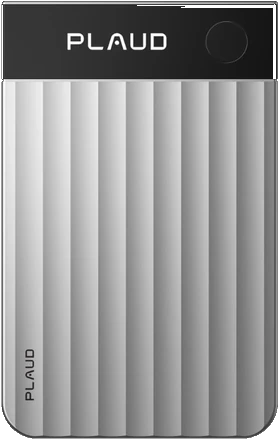
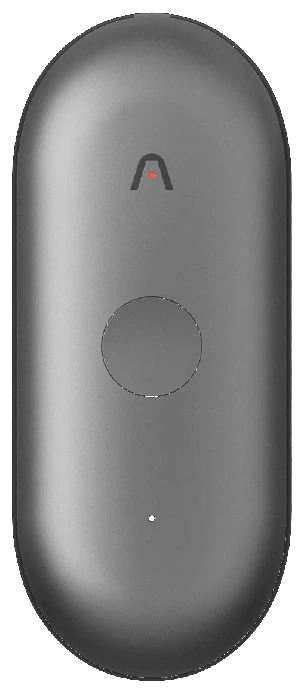
Plaud Note Pro and NotePin S

Put a Plaud on the table, and the conversation lands next to your calls: the same notes, the same search. The Plaud integration is part of Kasset Pro, and a yearly plan includes the device.

  • Pair from your phone. Hold the record button, and the Kasset app finds it over Bluetooth.
  • Long recordings, fast. A Note Pro can hand them over on Wi-Fi, about ten times faster.
  • Rooms and phone calls. The Note Pro also records calls on the phone it is stuck to.
  • No Plaud plan. Kasset transcribes the recordings itself, so the Plaud subscription can go.
Plaud Note Pro
Note Pro Rooms and phone calls
Plaud NotePin S
NotePin S Worn, for rooms
AI apps, through MCP

Claude, ChatGPT, Copilot and Cursor

Kasset runs an MCP server. Add its URL to your AI app, sign in once, and it can search the conversations you captured and cite what was said. It reads. It cannot record, edit or delete, and you can disconnect it in two clicks.

Server URLhttps://mcp.kasset.ai/

  • Claude
  • ChatGPT
  • Copilot
  • Cursor
  • Any app that speaks MCP

What the app can call

  • search_kasset
  • list_recordings
  • get_recording
  • get_transcript
  • list_action_items
  • list_notes
  • get_note
  • list_folders
Your tools

Notes that file themselves

Connect the tools your team already uses. After a recording, Kasset proposes the follow-up, the tasks, the CRM note, the recap, and does it when you say yes. Or write an automation and let it run on its own.

Email

Recaps and follow-ups, from your own address.

  • Gmail Send recaps and follow-up emails
  • Outlook Send recaps and follow-up emails

Tasks and issues

Every action item becomes a task, with its owner when somebody said who.

  • Todoist Turn action items into tasks
  • Asana Turn action items into tasks
  • Google Tasks Turn action items into tasks
  • ClickUp Turn action items into tasks
  • monday.com Turn action items into tasks
  • Wrike Turn action items into tasks
  • Trello Turn action items into cards
  • Linear File issues from what was decided
  • GitHub File issues from what was decided
  • Jira File issues from what was decided

Team chat

The short version, where the team already reads.

  • Slack Post summaries to your team channel
  • Microsoft Teams Post summaries to your team channel
  • Discord Post summaries to your team channel
  • WhatsApp Send recaps to a chat

CRM

The call lands on the deal, without anybody typing it up.

  • HubSpot Attach notes to deals and contacts
  • Salesforce Attach notes to deals and contacts
  • Pipedrive Attach notes to deals and contacts
  • Attio Attach notes to deals and contacts
  • Zoho Attach notes to deals and contacts
  • Odoo Attach notes to deals and contacts

Docs and databases

The full note, filed where the rest of your knowledge lives.

  • Notion Archive notes in your knowledge base
  • Confluence Archive notes in your knowledge base
  • Google Docs File the full note as a document
  • Google Sheets Log action items in a spreadsheet
  • Airtable Log records from the meeting
  • Supabase Write records to your database

Anything with an MCP server

Your own tools included.

Custom MCP server Add a server URL, and Kasset lists its tools and uses them like any other. It calls the server straight from France, with no one in between.

Start from an automation

An automation is an instruction the agent follows after a recording. New ones ask before acting.

  • Send the notes to my CRM

    Finds the matching deal or contact and attaches the meeting notes.

  • Email a recap to participants

    Drafts a short recap with decisions and next steps for the people in the room.

  • Create tasks from action items

    One task per action item, with the owner and due date when they were said.

  • Post the summary to the team channel

    Shares a short summary of the conversation where the team already reads.

  • Archive notes in the knowledge base

    Files the full note in a chosen space or database, so nothing lives only here.

AI models

Mistral by default. Others if you choose.

Everything runs on Mistral, in France, until a workspace admin allows providers outside the EU. Then each workspace picks its models. Where your data lives.

A few useful answers

Questions?

Does Kasset work as a note taker for Zoom, Google Meet and Teams? +
Yes. The Kasset app for Mac notices a call in Zoom, Google Meet, Microsoft Teams, Slack, Webex, WhatsApp, Discord or FaceTime and offers to record it. Whereby, Jitsi, Around and other call apps are detected too, and anything else your Mac can hear records when you press record.
Does it need a bot or a browser extension? +
Neither. Kasset records your microphone and your Mac's sound as two tracks, from the Mac itself. Nobody in the call sees a bot, and there is nothing to install in the browser.
Which calendars can I connect? +
Google Calendar, and Microsoft calendars: Outlook, Microsoft 365 and Outlook.com. Up to ten accounts, read-only. iCloud calendars are not supported.
Which Plaud devices work with Kasset? +
The Plaud Note Pro and the Plaud NotePin S, on Kasset Pro. You pair them from the Kasset app on your phone, and you do not need a Plaud subscription. Plaud + Kasset.
Can Claude or ChatGPT read my Plaud recordings? +
Yes, through Kasset. A Plaud recording in Kasset is one more conversation the Kasset MCP server can search. Add https://mcp.kasset.ai/ to Claude, ChatGPT or Copilot, sign in once, and ask. How to connect.
Which tools can Kasset send notes to? +
Gmail, Outlook, Todoist, Asana, Google Tasks, ClickUp, monday.com, Wrike, Trello, Linear, GitHub, Jira, Slack, Microsoft Teams, Discord, WhatsApp, HubSpot, Salesforce, Pipedrive, Attio, Zoho, Odoo, Notion, Confluence, Google Docs, Google Sheets, Airtable, Supabase. And any other tool that runs an MCP server: add its URL in Settings, Integrations.
Does Kasset act in my tools without asking? +
Not unless you tell it to. Every action is proposed on the recording first. An automation asks first too, until you set it to run on its own.
Where does my data go when I connect a tool? +
Only what the action needs goes to the tool: a note, an excerpt, the task. Tools from the gallery are connected through Composio, in the United States, which holds the sign-in and does not keep what passes through. A custom MCP server is called straight from our servers in France. Privacy policy.
Do integrations cost extra? +
No. Meeting apps, calendars, MCP and the tool gallery are in Kasset Core and Kasset Pro. The Plaud integration is on Kasset Pro. Pricing.
Is there a public API or a Zapier app? +
Not today. AI apps read Kasset through MCP, and Kasset reaches your other tools through the gallery or any MCP server you add.

Put it on kasset

Capture the conversation once. Then let it reach the tools, and the AI apps, you already work in.

Download